Sparkworks · circuit reference
How two button signals open the doors and disable the traps
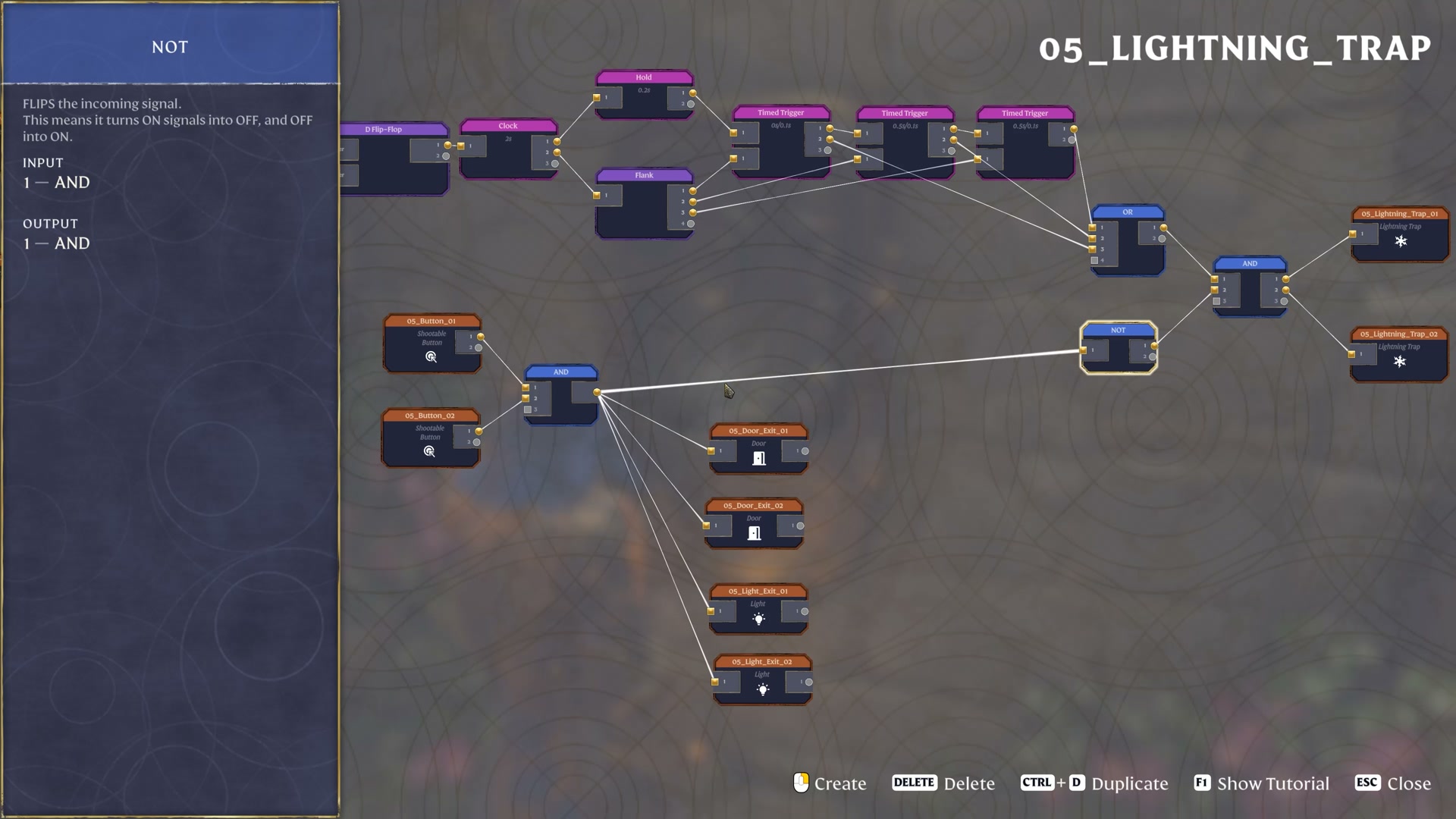
In the official example, two Shootable Button inputs feed AND. When both input signals are ON, AND sends ON to two doors and two lights. That same signal passes through NOT to disable the separate gate feeding two lightning traps.
Based on the October 8, 2026 prerelease demonstration. Sparkworks is planned for October 15.
Find the button-controlled branch
 Open full-size image
 AND: both input signals are required
Shootable Button 01 and Shootable Button 02 connect to the same AND node. Its direct output fans out to two doors and two exit lights.
AND supplies ON only when both input signals are ON. One ON signal is insufficient. In the official explanation, this is the condition that opens the doors and turns on the lights.
This describes signal states. It does not establish that two players must physically hold buttons at the same instant, or how long either button retains its signal.
NOT: use the success signal to block the traps
The button AND also connects to NOT. NOT flips the successful ON condition to OFF, then feeds another AND immediately before the lightning trap outputs.
The trap AND combines the pulse source with the inverted button condition. When both button inputs are ON, NOT supplies OFF, so this AND cannot pass a pulse to either lightning trap.
Before that condition is met, NOT permits the pulse branch through its input. It does not make lightning fire continuously: the trap output still depends on the other input, the pulse source. This diagram isolates this gate; it does not reconstruct the partly hidden pulse generator.
Compare all four input combinations
| Button 01 signal | Button 02 signal | Door / light branch | Trap permission from NOT |
|---|---|---|---|
| OFF | OFF | OFF | ON — still requires a pulse |
| ON | OFF | OFF | ON — still requires a pulse |
| OFF | ON | OFF | ON — still requires a pulse |
| ON | ON | ON | OFF — pulse blocked |
Use the same condition for an entrance and a hazard
The useful idea is that one success condition can control two opposite outcomes. Send AND directly to what should become active, such as the doors and lights, and send it through NOT to the hazard gate that should become inactive.
In this example, the doors, lights and trap permission all depend on the same pair of button signals. That avoids treating the trap shutdown as a separate, unrelated action.
The graph does not establish button latching, release timing, a repeat-run process or a global reset. It also does not provide a complete from-zero build or the entire lightning pulse generator. Keep those questions separate from the four input combinations shown here.
Watch the official condition being explained
4:06 — both button inputs disable the traps, open the doors and turn on the lights.
Source: Keen Games’ official Introducing Sparkworks demonstration, published October 8, 2026.